



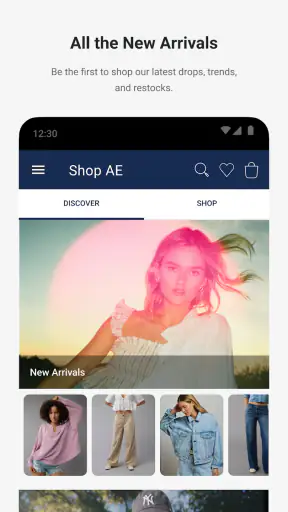
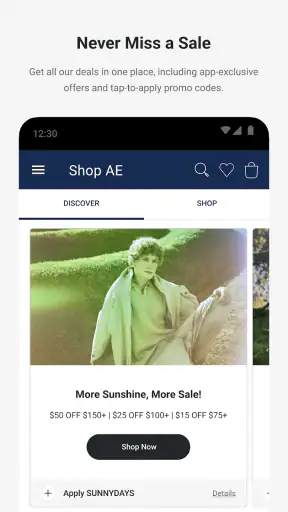
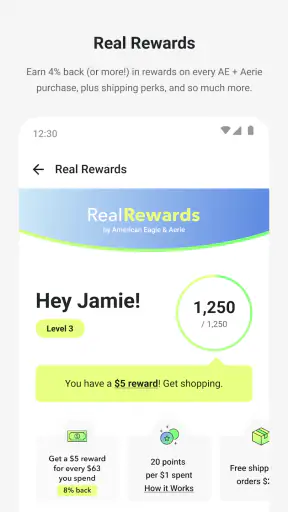


I approached AE + Aerie as a shopping companion rather than simply another clothing catalog. The app brings American Eagle and Aerie into one mobile experience, which makes sense if you already shop both brands or want to move between casual clothing, denim, intimates, and related collections without switching between separate destinations. My overall impression is that it is most useful when I have a clear shopping mission, such as checking a product while away from home, comparing options before visiting a store, or keeping an eye on an item I am considering.
It is a free shopping app from AEMobileApp, available to everyone and supported on operating systems from version 10 onward. Its long presence, dating back to November 2, 2011, is reflected in how familiar the basic retail flow feels. The current version is 26.15.0, and the app has passed five million installs. A 4.2 average from around 47 thousand ratings suggests that many shoppers find it dependable enough for regular use, although that number should not be mistaken for a guarantee that every browsing or checkout session will feel equally smooth.
How connectivity changes the shopping experience
Browsing is easiest when the connection is steady
The main strength of this kind of app is convenience: I can browse products, move through categories, inspect a particular item, and make decisions without opening a desktop browser. That convenience depends heavily on the network. Product imagery, listing details, availability information, account actions, and checkout steps all belong to the sort of shopping journey that works best with a reliable connection.
On a strong home or office connection, the experience feels straightforward. I can start with a broad idea, narrow the selection, and return to an item when I want to reconsider it. On a weak mobile signal, the same process becomes less pleasant because shopping is visual. If images take time to appear, it is harder to judge color, fabric impression, fit presentation, or small design details. This matters more for clothing than it would for a simple household reorder.
One practical habit makes a difference: I try to decide what I am looking for before beginning a long browsing session. Searching with a specific purpose is less frustrating than endlessly scrolling while moving between unreliable connections. If I am comparing denim styles, for example, I would rather inspect a focused group of products and record the details I care about than load a large number of pages in a crowded place.
A realistic commute scenario
Imagine noticing that your favorite jeans are wearing out while traveling to work. You open the app on a train, browse the American Eagle side, and find a similar style. That is a useful moment for mobile shopping, but it also exposes the limits of connectivity. A tunnel, crowded station, or overloaded network can interrupt image loading or delay the transition between screens. I would use that journey to research and shortlist, but I would avoid treating it as the ideal time for a complicated purchase.
The better workflow is to use the commute for discovery, then revisit the shortlisted item when the connection is stable. That small change reduces the chance of making a rushed choice based on partially loaded information. It also gives me time to check size, color, and delivery details carefully rather than trying to complete everything while standing or moving.
Mobile shopping is useful, but the screen is still a compromise
The app is naturally suited to quick checks. I can look up clothing while already thinking about an outfit, compare an Aerie item with something from American Eagle, or use a phone as a second opinion while shopping in person. This is more convenient than carrying a laptop through a store, and it keeps the two brand experiences close together.
However, a phone display is not always the best place to make a difficult fit decision. Product photos can be easy to inspect, but the smaller screen makes side-by-side comparison less comfortable than on a desktop. Long descriptions and several variations can also require more repeated scrolling. For a simple purchase, that is no major problem. For several items with different cuts, colors, and sizes, I prefer a larger screen or a physical store when possible.
That is where the app works best as a bridge between online and offline shopping. I can research before visiting a store, use the phone to remember a product name, or check whether a particular option is worth seeking out. I would not assume that the app can replace trying on clothes, especially when I am uncertain about fit or planning a larger wardrobe change.
Why the combined brand setup matters
The shared AE and Aerie focus is more useful than it first appears. Someone building a casual outfit may want to move between categories associated with both brands without starting over in a separate app. Likewise, a shopper who normally thinks of Aerie for one type of purchase may discover that the same mobile destination is convenient for a broader clothing search.
The trade-off is that a combined experience can feel busier than a narrowly focused store. If I already know I want one specific item, extra brand and category choices may add a little mental clutter. I get the most value when I am open to comparing related products, not when I want the shortest possible route to a single repeat order.
When the connection drops
Connectivity problems are most annoying during transitions: opening a product, changing a selection, moving into the bag, or continuing through checkout. A page that looks ready may still depend on another request completing in the background. If that request fails, I may need to wait, retry, or return to the previous step. That is normal friction for a connected retail app, but it is worth planning around.
My advice is simple: do not repeatedly tap a purchase control when the screen appears frozen. First check whether the page has changed, then wait for the connection to recover. Repeated taps can make it harder to know whether an action registered. If I am unsure, I reopen the relevant area and verify the bag or order state before trying again.
This is also why I prefer to complete checkout somewhere calm rather than at the exact moment I discover an item. A stable connection, enough battery, and a few uninterrupted minutes make the process easier to verify. Shopping apps are convenient, but convenience disappears quickly when a user is rushing through a weak signal.
Recovering without losing the thread
When browsing is interrupted, I try to preserve my own trail rather than rely on memory. I note the product name, color, or size I was considering, and I avoid closing the app until I know whether the page has recovered. If I had several possible choices, I narrow them to one or two before moving to another network. This is more reliable than attempting to rebuild a long browsing session from scratch.
A useful distinction is between a failed page load and a failed purchase action. If an image does not appear, I can usually wait and reload the product. If I have reached a transaction step, I become more cautious: I check whether the item remains in the bag and whether the app reflects the latest action before proceeding. That habit is valuable in any retail app, but it matters particularly here because shopping often involves multiple variants of visually similar clothing.
I also recommend keeping expectations realistic when switching rapidly between Wi-Fi and mobile data. The handoff may happen while a page is loading, leaving the screen in an uncertain state. Waiting until the connection is clearly stable is less frustrating than repeatedly refreshing. The app is designed for connected shopping, so recovery is mainly about giving the session a clean chance to continue rather than expecting it to behave like a fully self-contained catalog.
Using it without wasting mobile data
Clothing shopping can use more data than a text-heavy shopping task because images carry much of the decision-making. I would avoid opening every product in a large category while using limited mobile data. Instead, I start with the items that match my actual needs, inspect the most relevant images, and leave broad inspiration browsing for Wi-Fi.
This approach has another benefit: it reduces decision fatigue. Loading fewer pages encourages me to compare meaningful alternatives instead of collecting an endless list of possibilities. If I am shopping for a replacement pair of jeans, I can choose a preferred cut first, then compare colors or nearby styles. If I am looking at Aerie pieces, I can decide whether I am searching for everyday basics, a particular outfit, or a gift before opening many listings.
It is also sensible to postpone nonessential browsing when the battery is low. A phone that shuts down during a shopping session leaves me with less certainty about what I was viewing. I would rather use a quick session to identify candidates and then continue later under better conditions than keep browsing until the device becomes another source of friction.
Who will appreciate it most?
I think AE + Aerie is a good fit for shoppers who already like these brands, people who prefer browsing from a phone, and anyone who often combines online research with store visits. It is especially handy for checking a familiar category quickly or exploring both brand identities in one place. The free price also lowers the barrier to trying it instead of committing to a paid shopping tool.
It may be less suitable for someone who wants a universal marketplace with many unrelated brands, extensive price comparison across retailers, or a single dashboard for all shopping accounts. It is also not my first choice when fit is highly uncertain and I need the confidence of trying everything on. In those situations, a physical store or a broader comparison service may be more useful than a brand-focused app.
What the rating tells me—and what it does not
The app has around 13 thousand written reviews alongside its broader rating history. That gives prospective users more context than a star average alone, because retail experiences can vary depending on browsing, account access, checkout, delivery, and the specific products being considered. I would read recent comments for patterns, but I would still judge the app by my own shopping needs rather than expecting every session to match another person's experience.
My own standard is practical: can I find the right product, understand the choices, and complete or continue the purchase without unnecessary confusion? AE + Aerie generally makes sense when the answer is yes and the network is dependable. Its weaker moments are less about the concept and more about the vulnerability of mobile shopping to slow loading, interruptions, and the limits of a small display.
My connectivity verdict
AE + Aerie is a useful, focused shopping app when I treat it as a connected tool for discovery, comparison, and purchase decisions rather than as a replacement for every other way of shopping. Its strongest use cases are quick mobile checks, brand-specific browsing, and planning a visit or order with a clear goal. The combined American Eagle and Aerie experience gives it a practical advantage for shoppers who move between both collections.
My main recommendation is to browse flexibly but complete important decisions on a stable connection. Use mobile data for targeted searches, avoid rushing through checkout during a signal change, and keep a short record of items you are comparing if you are traveling. With those habits, the app feels convenient and appropriately focused. If you need broad retailer comparison, deep fit certainty, or a shopping experience that remains dependable without connectivity, I would choose a different route. For the right shopper, though, this free app is a sensible way to keep AE and Aerie within reach.


